Website2026-08-21
Klasičan Gejming — gaming portal in Serbian with its own CMS
A gaming portal that receives content every day and therefore has to endure years of updates without a developer. Own panel instead of WordPress, manual layout of the cover, and fighting for seconds on a mobile connection on a page full of images.

- Client
- Klasičan Gejming
- Activity
- Gaming portal — news, reviews, esports
- Region
- Serbia, content in Serbian language
- Type
- Multi-page publishing portal with a purpose-built CMS
- Technologies
- PHP 8.3 · MariaDB · Service Worker · PWA
- Scope
- 159 published news in ten categories
- Status
- Live site, in active maintenance
- Technology
- PHP 8.3 · MariaDB · Sopstveni CMS · PWA
Problem and context
What is Klasičan Gejming
Klasičan Gejming is a gaming portal in the Serbian language. Industry news, announcements of new titles, game reviews, esports and hardware — all in one place and all written in Serbian, with full diacritics, which is still rare in this niche.
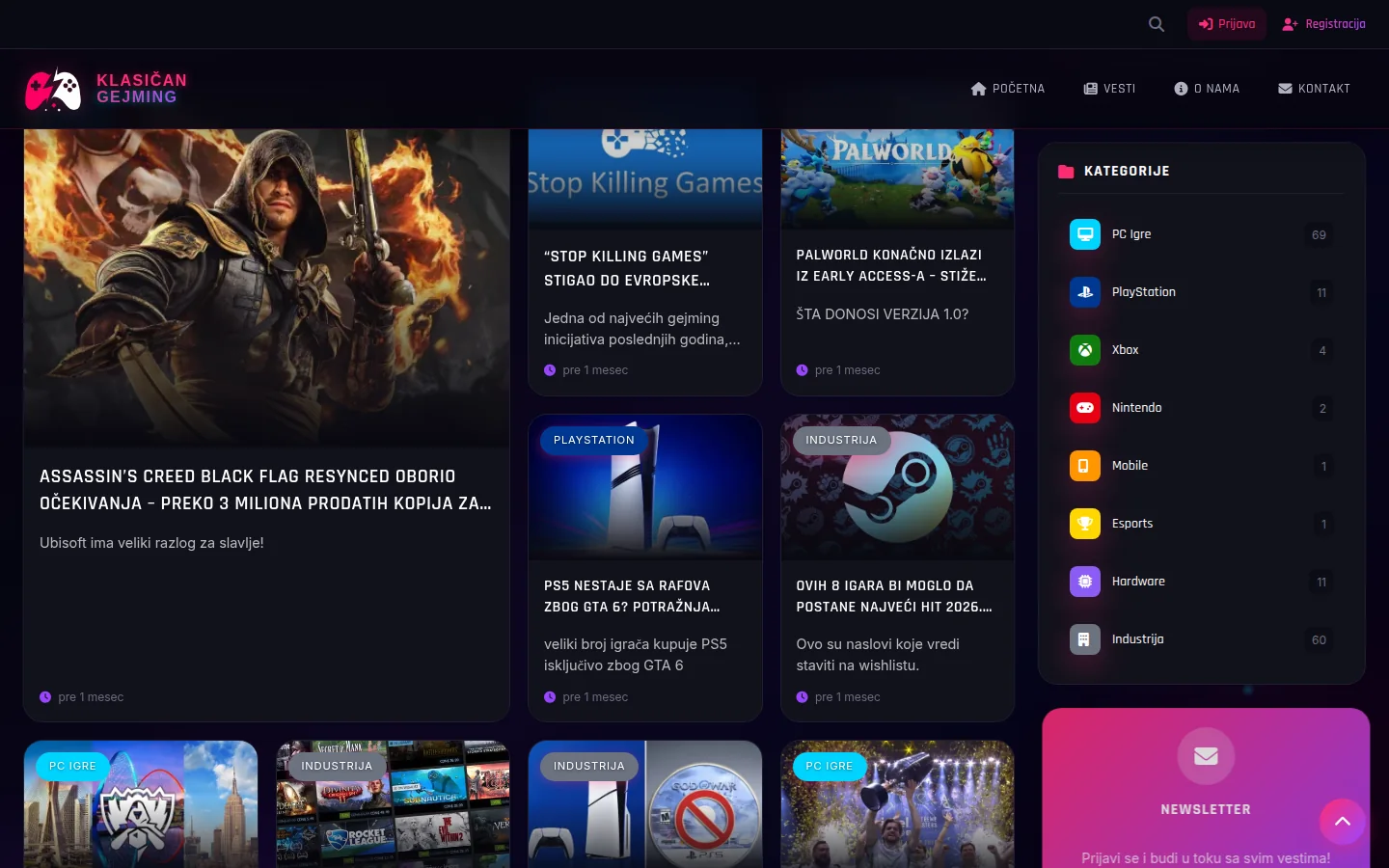
The content is in ten categories: PC Games, PlayStation, Xbox, Nintendo, Mobile, Esports, Hardware, Industry, Reviews and Retro. To date, 159 news have been published, with the largest share being carried by PC gaming and the industry — two topics that are followed daily. A reader who comes for a game release news finds a category, tags, and five related texts below.
The portal has no storefront, working hours or address; he is a medium, and that changes the whole business. A site of this type is not created once and left. He has to endure that content is added to him every day, for years, from the panel and without a developer on the line — otherwise it stops being replenished, and the portal that is not replenished dies in three months.
What needed to be solved
The brief called for a publishing platform rather than a brochure site. That led to four requirements that must work together:
- Publishing without a developer — an article is written, equipped with an image, category and tags and published from the panel, without touching the code.
- Control over the homepage — the owner himself chooses which articles appear in the slider at the top and in which order, because the top of the homepage is the most expensive space on the site.
- Phone speed — the majority of readers come from the mobile network, and to a page that is full of images by nature.
- Own code — no theme and no plugins to update every week to keep the portal from being hacked.
The last item had the greatest impact on everything else. A portal on a ready-made platform with a theme and a dozen plugins is the fastest way to start and the most expensive way to continue: each plugin adds third-party code, vulnerabilities and updates, its own updates and its own maintenance cycle, and a failure can happen at the least convenient time. Here, everything is written in PHP 8.3 on top of the MariaDB database, so the amount of third-party code that can fail is minimized and every part can be opened and fixed.
How the site is structured
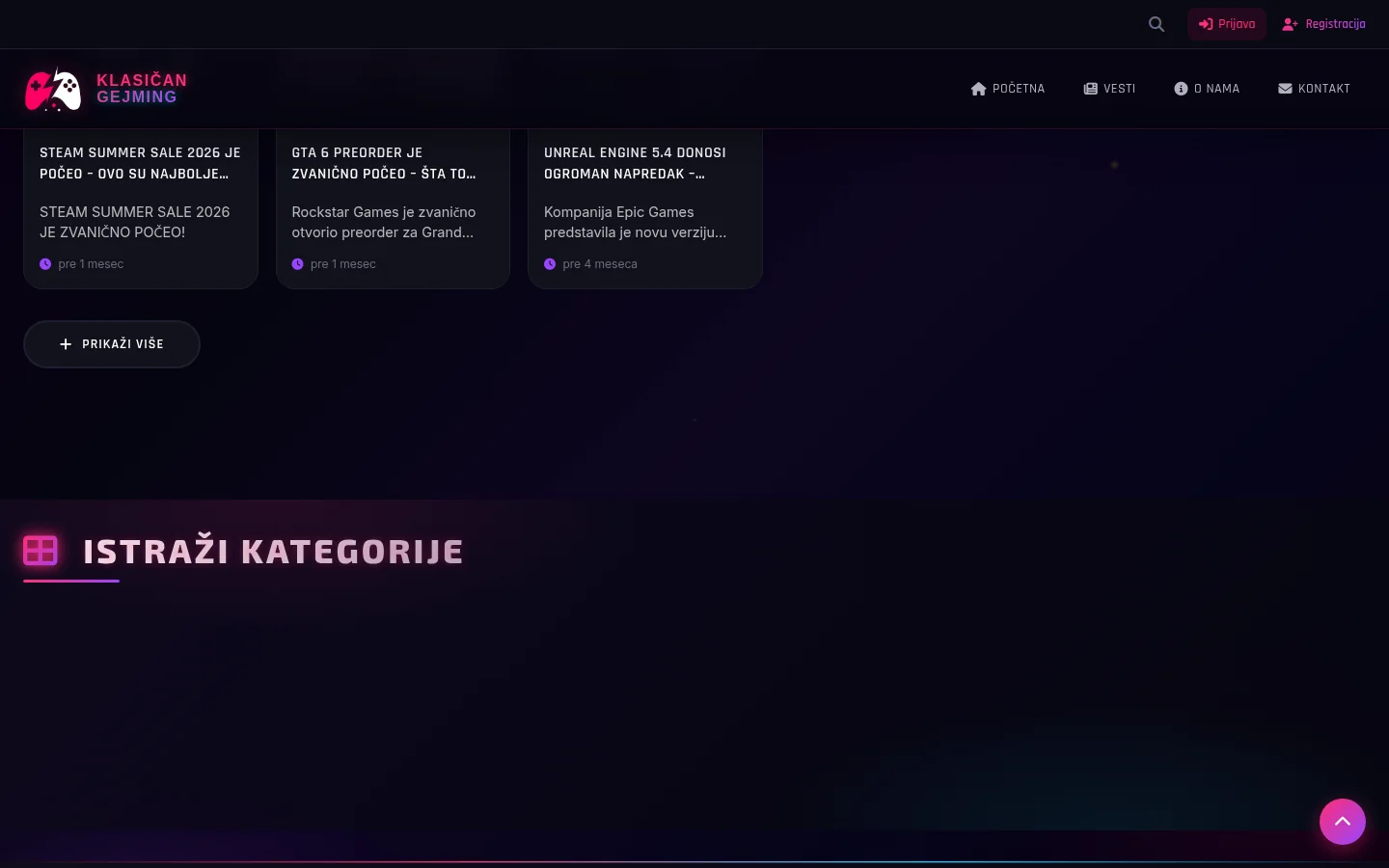
The cover has three layers. At the top is a slider with highlighted news, below it is a grid of the latest texts, and on the side are columns with the popular content of that week, a list of categories and subscription to the newsletter. At the bottom there is a block with all the categories and the number of articles in each, because the reader who came for one news then sees how many sites are behind it.
Three directions go from there. All News is a chronological archive that updates itself as you scroll — without pagination and without clicking to the next page. Categories like PC games have their own address, their own title and their own description. Tags capture what doesn't fit into a category — Steam, Epic Games, exclusives — and each tag has its own side, so the reader can follow a theme that cuts across all platforms.
Additionally, there is a search, application and registration of readers, and four static pages: about us, contact, privacy policy and terms of use. And they are edited from the panel, because the only thing worse than text that no one maintains is text that no one can edit without a developer.

Individual article page
The news page carries the most traffic, so it is the most done. Title, category, author, date, cover image, body text, footer tags, share buttons and comments for logged in readers. Below the article are related texts, so that the visit does not end on one page.
What is not visible is the part that is read by the browser: NewsArticle with author and absolute image address, BreadcrumbList with a breadcrumb trail through the category, and a canonical URL of the form /news/news-title. Canonical is one of the little things that pay later — the site at one point had articles under both /vest/ and /vesti/, so the old path was permanently redirected to the new one and aligned with the sitemap and all internal links. Until it was resolved, the same text existed for the search engine at two URLs and competed with itself for itself.
The address of the article is derived from the title, with Serbian characters translated into Latin counterparts. This means that the URL remains legible even when it is shared in a message, and that the title contains keywords in the address itself.
Another detail that works in the background: every review is recorded in the database. The block "Popular this week" is therefore not a manually maintained list, but a consequence of what is actually read.
Slider on the cover and a long-hidden bug
The slider at the top of the homepage shows five featured news. The first version selected them automatically — the five most recent marked as featured. That sounds reasonable until the owner wants the older but good news to come first; then the automatic works against him, and he has no way to override it.
That's why the order has been switched to manual. In the panel there is a "Featured News - Slider Order" panel where items can be dragged with the mouse or moved with the keyboard arrows, with a clear line showing where the top five end, that is, what is seen on the site in general. The sixth still stands, only dimmed—to make it obvious why it doesn't appear. The entire sequence is recorded in one transaction: either the entire sequence passes, or nothing passes. If the highlight list has changed in another window in the meantime, recording is rejected with a message instead of silently overwriting someone else's change.
There was a bug that the owner reported by saying that unhooking does not work. It didn't work, and the reason was awkward: an unchecked checkbox is not sent to the server by the browser at all, and the server side interpreted the absent value as an instruction to leave the value as it was. It was possible to mark the news, but not to mark it — and without a single error message, which is the worst kind of failure. In addition, clicking on the visible switch in the list went empty, because the switch was not connected to the field it changes, so only the invisible box below it worked.
The fix was in three layers: the form now always explicitly sends both the on and off states, the server changes only those fields that actually arrived, and the switch is connected to its own field. It was tested on a live site, both ways, with a page refresh between steps.
Panel - what the owner uses every day
Instead of a generic content management system, the panel is tailored for the portal: news editor with images, categories and tags, media library, list of categories and tags, approved comments, users, newsletter, banners with own text positions and reports on traffic.
The image is uploaded once, and the system automatically creates smaller versions for the news grid and larger ones for the article page, all in WebP format. It's not cosmetics. A twelve-card grid that pulls full-size images is the same site that waits five seconds on the phone, the only difference is that no one has prepared the derivatives.
The panel is also a place where you can see what is actually being read — views by news, by category and by returning visitors. Statistics inside the site answer the question of what to write next better than any external tool, because it calculates from the same rows of the database from which the site is displayed.
Access to the panel is closed on both levels: those who are not logged in are returned to log in, and every request that changes something must carry an administrator account and a token against forged requests. Without that, one prepared link in someone else's message is enough to delete something on behalf of the logged-in administrator.
Performance — the hardest part of the job
A portal with an image on each card is the worst possible case for a mobile connection, and it showed in the first measurements: the time to the Largest Contentful Painted element on the phone was over six seconds. Three layers were to blame — fonts and icons from someone else's servers, about twenty separate CSS files in the header, and full-size images in the grid.
It was solved in order. Google's fonts and icon set were moved from someone else's servers to our own, eliminating the whole loop of opening a link to a third party before anything could render. Then the icon set is cut down to those that are actually used: from about 386 KB to about 33 KB on the wire. The icons are counted by a script left in the project, so the set can be recreated when a new page is added. The search was more boring than it sounds — part of the icon name is not in the code, but in the database, and part of it is changed in the browser on the fly, for example the password view.
Images in the grid have moved to intermediate versions with srcset descriptions, the first image in the slider is loaded with priority and preannounced, and everything below the first screen is delayed. CSS is merged into one package.
The result on the phone, measured under slow connection conditions: LCP from 6.24 s to 4.91 s, performance score from 63 to 76, first content display from 3.01 s to 2.43 s. On desktop it scores 95 with an LCP of about 1.5s, and accessibility and best practices are at 100. A portal with this many images will never run as a blank page with three lines of text, and that's an honest framework in which to read these numbers.
Phone app and cookies
The site is also a PWA — it has a manifest and a service worker, so it can be added to the phone's home screen and act like an app, including reading already visited pages when the connection fails. On the site, it appears as a non-obtrusive bar with an offer to install, which can be closed and does not return intrusively.
A service worker is useful and dangerous for the same reason: he remembers. That's why every change seems to carry a new version tag, both for the styles and for the worker itself. Without that discipline, old visitors look at the old version of the site for days and report that the change was not made, but the change was made and is on the server.
Cookies go over the bar with two clear answers — opt-in or just necessary — and analytics are set to measure only what is allowed to consent. The choice is remembered and respected on the next visit. On a site that receives registrations, this is not a formality but an obligation.
SEO and visibility
The sitemap is created from the database and today has 199 addresses: 159 news, categories, tag pages and static pages. Since it is generated from the database, the new news is in the map the moment it is published, without any additional steps.
Each category has its own title and description. That sounded like a done deal until it turned out that all the categories had the same generic title, because the template was reading a variable that was never set on those pages. Ten pages with the same title are to the search engine ten pages without titles. Today Industry and PC games are not the same page neither by title nor by description.
This is accompanied by WebSite and Organization data on the homepage, a list of the latest news as an ItemList, and a search reported as an action that the search engine can offer directly in the results. The site has been verified in Google Search Console.
One decision is deliberate and worth mentioning: robots.txt explicitly allows bots of the artificial intelligence system as well. The answers of those systems are more and more often above the classic list of results, and the portal that blocks them drops out of them silently and without any warning. For a media outlet that lives off being quoted, it's a loss that goes unnoticed until measured.
Security and maintenance
A portal that receives registrations, comments and contact form messages is a target, and is treated as such. The headers are fully set: content policy, mandatory HTTPS with a long expiration date, restriction on nesting the site in third party pages, turned off camera, microphone and location permissions, and a strict rule about how much data is sent when visiting another site. The last measurement of the certificate settings gave an A+ rating.
Fixed a few things on the app side that aren't visible from the outside. Editing and deleting comments previously only required a login — now they require an admin account and an anti-forged request token. Backup files, which were once served as plain text, have been moved from the public part of the server; source code that anyone can read is an oversight that is only noticed when it is too late. The session cookie has been reduced to a stricter policy for sending to other sites.
Maintenance is also specific. When the dependency checker reported six security warnings on the libraries used by the portal, they were updated, and the contact form was immediately verified to still deliver mail — a patch that silently breaks email is worse than a patch that doesn't. There are no open warnings today. Before each change, a backup copy is made, the code is stored in a private repository, and after each change, the cache on the server is refreshed, because otherwise the new version would have to be waited for hours.
Outcome
What the client received
A portal that is his. The news is written and published from the panel in a few minutes, the image is uploaded once and gets all the necessary sizes automatically, the homepage is edited by hand, and readers who have added the site to the home screen get it as an application.
No monthly platform subscriptions and no twenty plugins waiting to be updated. The code and database are on the server, they can be copied and moved. If a new category, a new section or a new page is needed tomorrow, it is a change in the panel, not the creation of a new site.
The site is still under active maintenance. The last major changes were speedup on the phone and manual slider order, and before that fixes that brought back comments and infinite loading in the news archive. Questions and suggestions go through the contact page, where the editors state that they will respond within 24 to 48 hours.
FAQ
Frequently asked questions
Why own CMS and not WordPress?
Because of maintenance and speed. A portal on a finished platform easily collects a dozen plugins, and each of them is someone else's code that needs to be updated and that will fail one day. Here, everything is in custom PHP code backed by MariaDB, the panel does exactly what the portal needs and nothing more, and there is no monthly subscription.
Can the owner himself publish news?
Yes, and that was a requirement from the beginning. The news is written in the panel, gets a picture, category and tags and is published immediately. The image is uploaded once, and the system itself creates smaller and larger versions that the site uses in the news grid and on the article page.
How do you choose what goes in the homepage slider?
Manually. In the panel there is a board where the highlighted news are dragged with the mouse or moved with the keyboard arrows, and the first five go to the slider. The sequence is recorded in one transaction, so it cannot happen that half of the new schedule is written and half is not.
Does the site work on the phone and can it be installed?
It works, and most of the readers come on a phone. The site is made as a PWA, so it can be added to the home screen and opened as an application, reading already visited pages and when the connection fails.
What happens when the portal grows to a thousand articles?
Nothing that would require a new site. The archive is replenished automatically while scrolling, the sitemap is created from the database so that new news is in it immediately, and categories and tags keep the structure. Growth is limited only at the server level, not at the code level.
How long does it take to create a portal like this?
Realistically, it is measured in weeks and depends on the number of sections and how much should be adjustable from the panel. Most of the time is usually taken by the category structure, the panel and the preparation of images, and not by the public part of the site alone.
Up next
Related projects

Balkan RP
Independent demo for a FiveM roleplay community — the entire page is one continuous flight through the city, seven chapters over it and three viewing modes.
Case study
Leskovački Kutak
Grill restaurant with two locations in Belgrade: online order, selection of the nearest restaurant by address, credits and mobile app.
Case study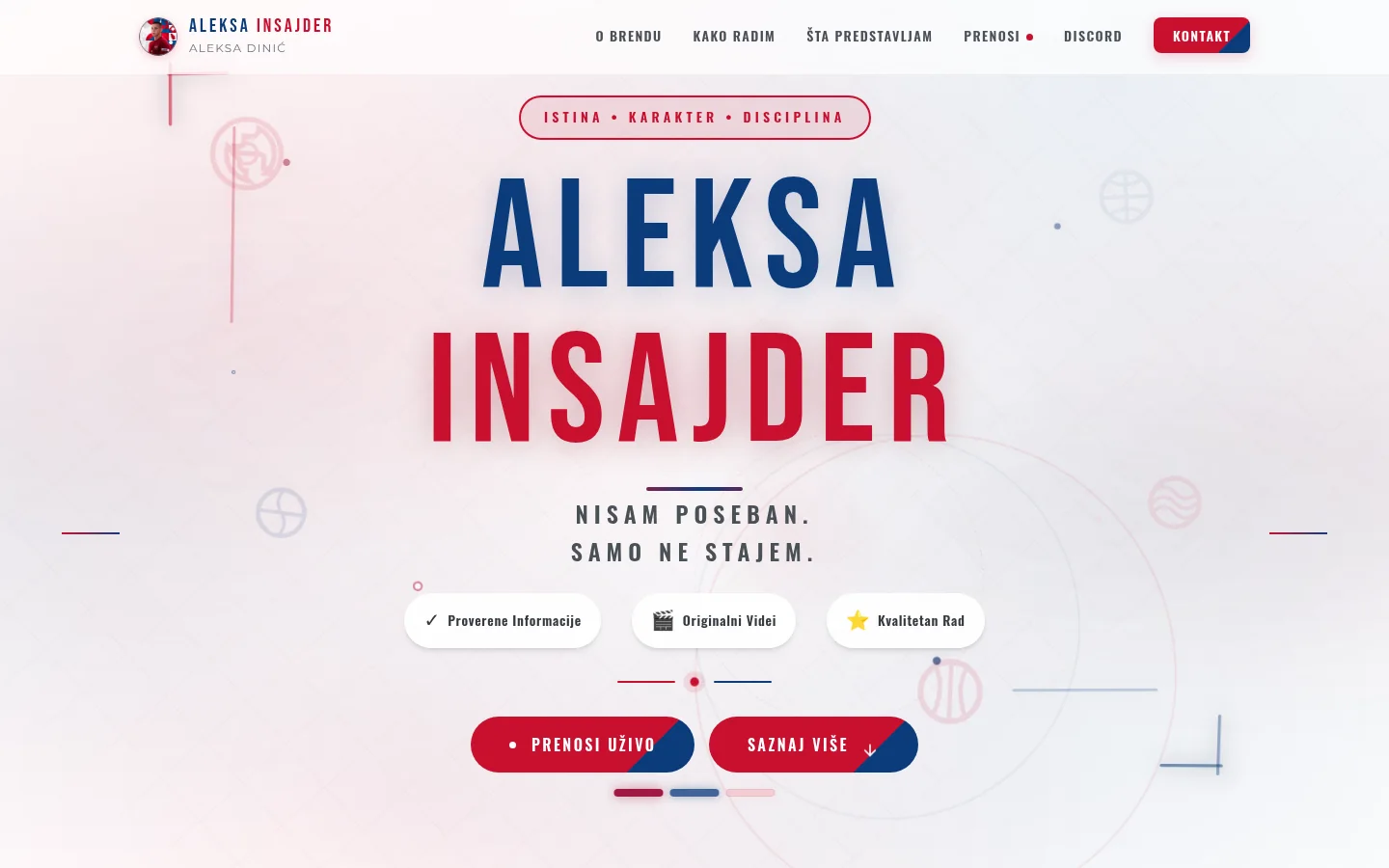
Aleksa Insajder
A one-page brand site of a sports creator, with a broadcast page that the owner loads from a panel and his own statistics without cookies.
Case studyNext step
Have a project that needs to work better?
Send me your goal and current situation. I will reply with a concrete scope proposal.
Start a project